Miraplacid Publisher 2012 (Virtual Image Printer Driver)
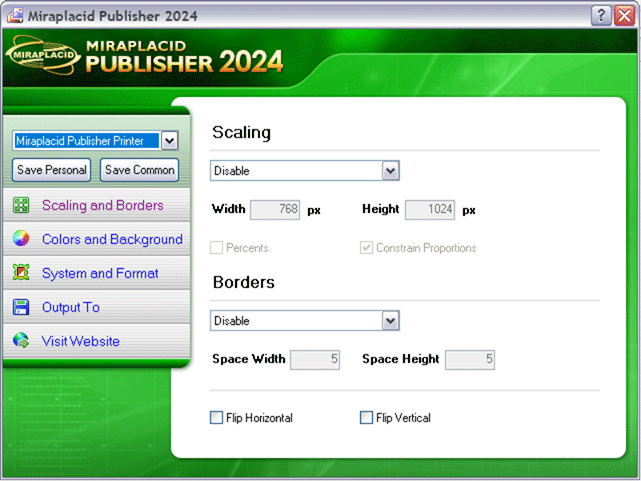
With Miraplacid Publisher software you can convert (print) any document to an image or web presentation. Anyone can open your document across a broad range of hardware and software, and it will look exactly as you intended - with layout, fonts, and images intact. No one can modify or copy and paste your texts.
After installation on your PC,
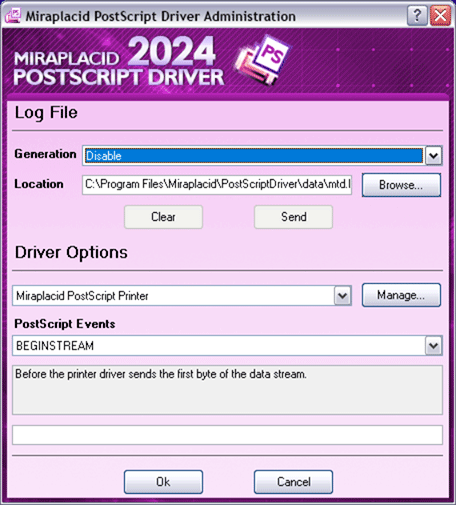
Miraplacid Publisher appears as a new virtual printer in your system. All the documents you
print to this "printer" will be opened in a preview dialog. You scale the image,
adjust hue, saturation and value,
get rid of unused white borders, and do some other image processing.
Then you can save resulting images to disk, upload to FTP or HTTP server, email, or print them
to a real printer.
Miraplacid Publisher supports following output formats:
PDF, JPEG, GIF, TIFF, BMP, PNG, TGA
and Web Presentation.
When redirecting to a printer, reduce saturation to save color cartridge or increase value
to save black ink. Use borders detector in manual mode to set printing area when you need
to print only the document part you need.
Miraplacid Publisher is integration-ready software. All the settings can be easily managed
from your software or script.
If your company use Terminal Server, Terminal Server Edition of Miraplacid Publisher could be
perfect fit for you.
If you wish to use Publisher as integrated part of your own product, please, use Miraplacid Publisher SDK.
Platform: Windows 2000/XP/2003/2008/Vista 32/64 bit/Windows 7 32/64 bit/Windows 8 32/64 bit
|
|
|
Miraplacid Text Driver 2012 (Virtual Text Printer Driver)
Miraplacid Text Driver extracts text from any printable documents. Accounting professionals, Medical Insurance companies, Health care providers and many others use it to extract text from all kind of document formats they receive and import it into their systems.
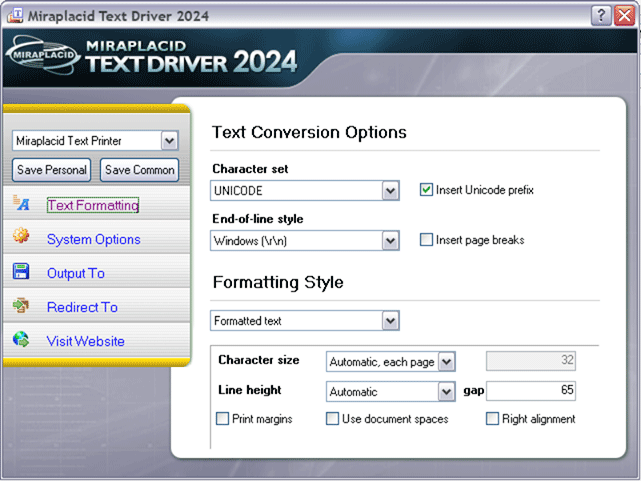
After installation on your PC, Miraplacid Text Driver appears as a new printer in your Windows system. When document is printed, Miraplacid Text Driver opens a dialog with Preview Window. You can save resulting text to disk, upload to FTP or HTTP server, print to a real printer, email or just copy to Clipboard. You can save extracted information as plain or formatted text or as XML for future processing. Miraplacid Text Driver supports all installed codepages and Unicode. Miraplacid Text Driver adds an icon to desktop. All the documents you drag and drop to this icon will be printed behind the scenes and processed by Miraplacid Text Driver. Turn "Auto Save Mode" on if you want Miraplacid Text Driver to handle text extraction and processing without waiting for your input. It can automatically name files and toss them to folders based on date and time, document name, as well as print job and page number.
If you need a hard copy of the extracted text or original document or both, Miraplacid
Text Driver can print it to a real printer for you.
Text Driver supports text printing from DOS programs.
If your company use Terminal Server, Terminal Server Edition of Miraplacid Text Driver could be a perfect fit for you.
If you wish to use Text Driver as integrated part of your own product, please, use Miraplacid Text Driver SDK.
Platform: Windows 2000/XP/2003/XP 64-bit/2008/Vista 32/64 bit/Windows 7 32/64 bit/Windows 8 32/64 bit
|
|
|
Miraplacid Data Viewer / Binary DOM SDK
Miraplacid Data Viewer is a file structure viewer. It shows internal hierarchy of a file as a tree.
Viewer highlighted selected tree item in the hex viewer panel. A byte selected in a hex viewer can be looked up in the tree.
Miraplacid Data Viewer is powered with rich search and data mining capabilities.
User can explicitly specify type of the loaded file, or let Viewer to auto-detect it, and save selected chunks of data to a file.
Miraplacid Data Viewer is based on Miraplacid Binary Document Object Model (DOM) technology.
This technology is designed for software engineers to speed up binary files access programming. Just like Miraplacid Data Viewer, it provides access to binary file internals.
Moreover, it allows client software to modify binary file internals, conveniently add or remove parts of binary file, and even create a file from scratch.
Miraplacid Binary DOM Software Development Kit (Miraplacid Binary DOM SDK) contains documentation and examples to demonstrate the power of Miraplacid Binary DOM technology.
In order to work with specific file format, the technology requires binary data definition (bdd) file for this format to exist.
Miraplacid Date Viewer comes with definitions for many popular file formats. More formats are available from community-supported web site http://binarydom.com.
All binary data definition files shipped with Miraplacid Data Viewer, and all files on binarydom.com are released under
creative commons share-alike license, can be modified and used for both commercial and non-commercial purposes.
Miraplacid Binary DOM technology, together with Miraplacid Data Viewer and Miraplacid Binary DOM SDK are free for personal use and for qualified educational institutions.
Platform: .Net 2.0 and higher
|
|
Miraplacid Form 2.3
Miraplacid Form 2.3
is for filling out scanned paper forms on your PC. Software consists of Form Designer to
prepare the form and Viewer to fill it out and print. You can save the form and fill it
again later. Miraplacid Forms released in two editions: Lite and Professional.
Free Lite edition (only version 2.1 available) includes all the basic functionality.
Commercial Professional Edition includes all the functionality of the Lite version plus
extended form editing features including multi select and group operations,
comma delimited (CSV) data files support, acquire images from scanner and export form to PDF.
Scan the form into Miraplacid Form, add "First Name", "Last Name" and other fields, fill the
form and print it. To operate with data, export data from the database or spreadsheet to CSV file,
load the CSV file to Miraplacid Form, bind data columns to form fields with mouse drag and drop
operation and click "Print". Besides, you can save the data you entered or changes to CSV
file and import it to your database or spreadsheet.
Platform: Windows 98/Me/2000/XP/2003, Microsoft .NET runtime
|
|
|
Miraplacid Scripting Components
Miraplacid Scripting Components (MSC) is a set of Active Server components you can use from your stand-alone scripting applications and ASP pages (VBScript and JScript).
Miraplacid Scripting Components is the first third-party ASP toolkit with Unix/Linux support.
Windows and Unix/Linux versions have absolutely identical interface and functionality.
100% Microsoft IIS ASP and UNIX/Linux Chili!ASP (now Sun ONE Active Server Pages) compatibility.
You can just copy your ASP code from Windows to Linux and it will work!
Platform: Windows 98/Me/2000/XP/2003/XP 64-bit/2008/Vista 32/64 bit, RedHat Linux
|
Our Products
Related Services
News Services
Become a Reseller
Become a Reseller of Miraplacid products!
As a reseller, you will be able to purchase Miraplacid Publisher and Miraplacid Text Driver for only $30.95!
Also, you will be able to distribute Binary DOM Library only for $49.95!
Hot topics at our Forum
Hot News
|